Editors#
Widgets for tuning numbers and colors in demo panels - all C++ core, so the
Python bindings get the same surface (see python/tests/test_editors.py).
DragValue scrubs a value like a Blender number field: drag horizontally to
change it, click to type, Enter commits, Escape cancels, arrows nudge when
focused. Vec2Edit/Vec3Edit/Vec4Edit give one labeled field per axis and
borrow the caller's float[N] - edits write into it and external writes
mirror back on the next tick (numpy arrays work as-is). ColorEdit is a
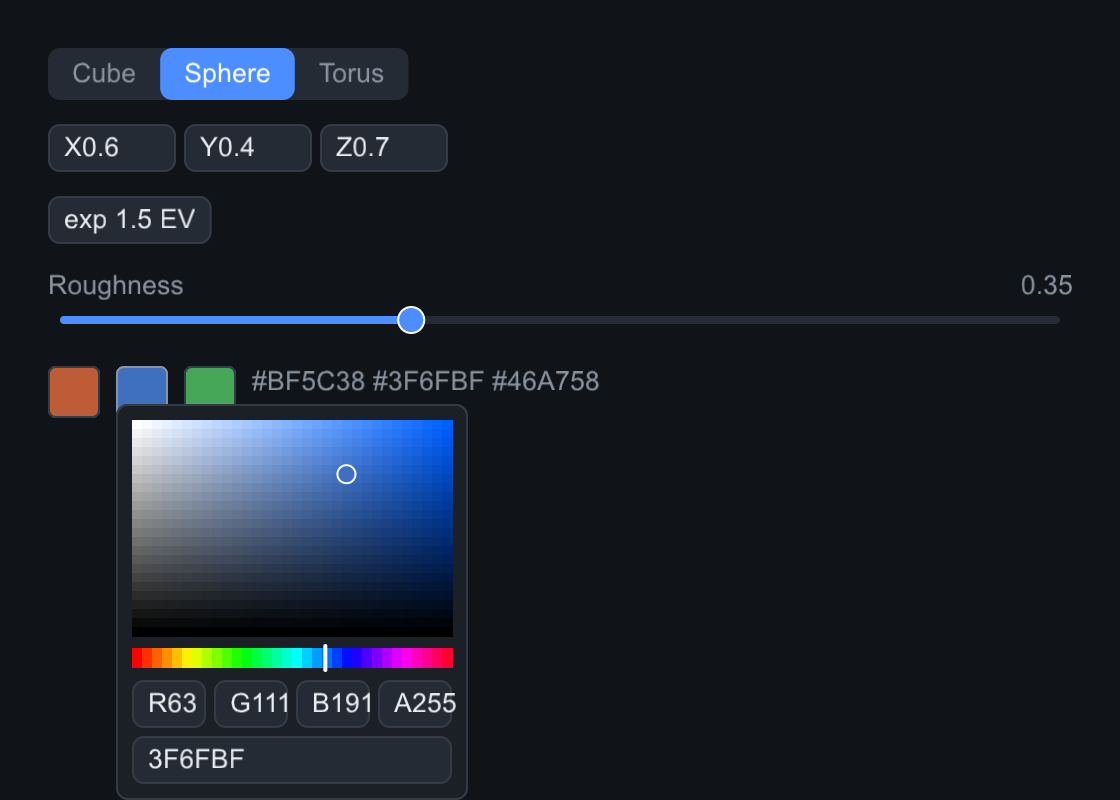
swatch that opens an SV square + hue popup with hex and RGBA fields.
Segmented is a compact radio-style row. When focused, Left/Right select the
previous/next segment (wrapping) and Home/End the first/last.
The family, as pictured#
Every image on this site is real output: tools/components_capture.cpp
builds this exact tree with the software backend, hovers and clicks the
middle color chip so the picker popup is open, and dumps the framebuffer.
root.add<slikui::Segmented>().set_items({"Cube", "Sphere", "Torus"})
    .set_selected(1);
static float light_dir[3] = {0.60f, 0.40f, 0.70f};
root.add<slikui::Vec3Edit>(light_dir, "XYZ");   // borrows the array
root.add<slikui::DragValue>(1.5f).set_prefix("exp ").set_suffix(" EV");
root.add<slikui::Slider>(0.f, 1.f).set_label("Roughness")  // built-in caption row
    .set_format("%.2f").set_value(0.35f);
auto& colors = root.add<slikui::Row>();
colors.set_gap(8);
colors.add<slikui::ColorEdit>(slikui::Color::from_hex(0xBF5C38));
colors.add<slikui::ColorEdit>(slikui::Color::from_hex(0x3F6FBF));
colors.add<slikui::ColorEdit>(slikui::Color::from_hex(0x46A758));
colors.add<slikui::Label>("#BF5C38 #3F6FBF #46A758")
    .set_color(ctx.theme().text_dim);
import numpy as np

root.add(slikui.Segmented, items=["Cube", "Sphere", "Torus"], selected=1)
light_dir = np.array([0.60, 0.40, 0.70], dtype=np.float32)
root.add(slikui.Vec3Edit, light_dir, "XYZ")     # borrows the array
root.add(slikui.DragValue, 1.5, prefix="exp ", suffix=" EV")
root.add(slikui.Slider, 0, 1, label="Roughness", format="%.2f", value=0.35)
colors = root.add(slikui.Row, gap=8)
colors.add(slikui.ColorEdit, color=slikui.Color.from_hex(0xBF5C38))
colors.add(slikui.ColorEdit, color=slikui.Color.from_hex(0x3F6FBF))
colors.add(slikui.ColorEdit, color=slikui.Color.from_hex(0x46A758))
colors.add(slikui.Label, "#BF5C38 #3F6FBF #46A758") \
    .set_color(ui.ctx.theme.text_dim)
Note
The labeled Slider in this tree demonstrates Slider's built-in
caption row; the full Slider API lives on
Controls.
Segmented#
| API | Signature |
|---|---|
set_items |
(std::vector<std::string>) |
set_selected |
(long index, bool fire_callback = false) |
on_select |
(std::function<void(size_t)>) |
set_fill |
(bool on = true) - span the parent instead of hugging the labels |
segment_rect |
(size_t index) -> Rect - a segment's rect, e.g. to anchor a popover |
By default a Segmented hugs its labels. With set_fill() it spans the
parent: the full width of a Column, or the leftover width in a Row. Its
segments share the width as evenly as their labels allow; a label wider
than an equal share keeps its natural width. When there isn't room for
every label, short labels stay whole and long ones elide.
set_speed scales drag sensitivity (value change per pixel), set_step
quantizes, set_int_mode makes it an integer field, and
set_prefix/set_suffix/set_format dress the readout - the example above
reads exp 1.50 EV.
| API | Signature |
|---|---|
set_value |
(float, bool fire_callback = false) |
set_range |
(float min, float max) |
set_speed |
(float) |
set_step |
(float) |
set_int_mode |
(bool) |
set_prefix / set_suffix / set_format |
readout decoration |
on_change |
(std::function<void(float)>) |
Vec2Edit, Vec3Edit, Vec4Edit#
One labeled field per axis over a borrowed buffer: edits write into it and external writes mirror back on the next tick.
| API | Signature |
|---|---|
set_labels |
(std::string) - one char per axis |
set_range |
(float min, float max) - all axes |
set_axis_range |
(int axis, float min, float max) |
set_int_mode / set_step |
like DragValue |
on_change |
(std::function<void()>) |
ColorEdit#
Keyboard: Space or Enter opens the picker with focus on its R field. Tab walks R, G, B, A and hex, and Escape closes the picker and returns focus to the swatch.
A swatch that opens an SV square + hue popup with hex and RGBA fields.
| API | Signature |
|---|---|
set_color |
(Color, bool fire_callback = false) |
on_change |
(std::function<void(Color)>) |