Input & events#
Backends translate native events into one slikui::Event vocabulary;
Context::handle routes them. Your application code rarely constructs events
by hand in C++ - the window layer does it - but the vocabulary
is the same on every platform and it is exactly what you translate (or
synthesize in tests) yourself.
To react to what the user does with the built-in widgets, you don't need
events at all: use their callbacks (on_click, on_change, ...), see
Callbacks. Events matter when you write your own widget or
host.
The event vocabulary#
Hosts send raw input:
| Event | Carries | Notes |
|---|---|---|
MouseMove |
pos, delta, mods |
logical points, y-down |
MousePress / MouseRelease |
button, pos, mods, clicks |
any button; routed through hit-testing |
Scroll |
pos, scroll, mods |
wheel ticks |
KeyPress / KeyRelease |
key, mods, repeat |
focus-routed; repeat marks auto-repeat presses |
TextInput |
codepoint |
Unicode scalar, to the focused widget |
FocusLost |
- | the app lost focus: cancels drags, closes popups |
FrameResize |
pos = pixel size |
converted to the logical frame |
The Context synthesizes these for widgets (hosts never send them):
| Event | When | Delivered to |
|---|---|---|
Click |
press + release on the same widget, any button; clicks = 1, 2, 3... |
the pressed widget, bubbling |
DoubleClick |
after the Click whose clicks == 2 |
the pressed widget, bubbling |
MouseEnter / MouseLeave |
the pointer entered / left the widget and its descendants | that widget only |
FocusGained / FocusLost |
keyboard focus moved (or the app lost focus mid-drag) | that widget only |
PopupClosed |
this popup or dialog left the screen (click outside, Escape, focus loss, menu action, close_popups, ...); sent after the closing event, skipped if it was reopened in the same pass |
the popup's root widget only |
clicks counts presses of the same button within
Event::kMultiClickTime (0.4 s, Python slikui.Event.MULTI_CLICK_TIME) and
kMultiClickSlop (4 px) of the previous one. Events carry no timestamps, so
the timing is measured on the Context's tick clock: headless tests must
advance ticks between clicks.
Python event constructors (slikui.mouse_press, text_input, scroll,
key_press, ...) build real Event values that drive the real dispatch path
- the simulated-input tests use them.
Routing rules#
- Hit-testing - the deepest visible widget containing the pointer wins.
- Bubble up - the event dispatches up the parent chain until a widget
consumes it (widgets return
truefromon_event). Enter/Leave, FocusGained/FocusLost and PopupClosed never bubble. - Every button - left, middle and right presses all reach widgets (built-ins act on the left button only). A right press on a widget with a context menu opens the menu instead; that press and its release are not delivered.
- Focus - key/text events go to the focused widget; with nothing
focused, key events go to the hovered widget. A left click focuses the
nearest focusable ancestor of the hit; Tab /
Shift+Tab cycle focusables in tree order;
Escape clears focus. Tab, Escape and shortcut chords are
consumed by the Context. A
KeyReleaseis delivered only for a press the tree received. The focused widget gets an accent focus ring after keyboard navigation (Tab, arrow keys, Home/End, PageUp/PageDown) and none after a click, like:focus-visibleon the web (Context::focus_visible). Text widgets show focus with their accent border instead. OverrideWidget::draws_own_focus,focus_rectorpaint_focus_ringto change it. Closing a popup that holds focus returns focus to the widget that was focused when it opened. While a popup is open and focus is not inside one,KeyPressandTextInputgo to the topmost popup's root first (aMenuuses them to navigate); whatever it doesn't consume continues to the usual target.
Widget keys#
| Widget | Keys (when focused) |
|---|---|
| Button, IconButton | Enter / Space click |
| Checkbox, Radio | Space toggles |
| Switch, Expander | Space / Enter toggle |
| Slider | arrows a step, PageUp/PageDown a tenth, Home/End the ends |
| DragValue | arrows a step, Enter to type a value, Escape cancels |
| Vec2Pad | arrows 1% (Shift 10%) |
| Tabs, Segmented | Left/Right (wrapping), Home/End |
| ListView, Table | Up/Down, Home/End, PageUp/PageDown; Enter/Space on_activate |
| TreeView | as ListView; Right opens / enters, Left closes / goes to the parent |
| Dropdown | Up/Down/Home/End step while closed; Space/Enter/Alt+Down open |
| ColorEdit | Space/Enter open the picker |
| Menu (open) | Up/Down, Home/End, letters, Enter/Space, Right/Left for submenus |
| MenuBar | one Tab stop; Left/Right between titles, Down/Enter/Space/Up open; F10 from anywhere |
| Splitter | arrows along the split 10 px (Shift 50 px), Home/End |
| LogView | Up/Down, PageUp/PageDown, Home/End scroll back (hovered too) |
| ScrollArea | Up/Down, PageUp/PageDown, Home/End that a widget inside left unconsumed |
Escape closes the topmost popup, then the topmost dialog, then clears focus.
F10 opens the menu bar (and closes open popups); focus returns where it was
once the menus close.
A focused text widget (TextField, SearchBox, TextArea, a
DragValue being typed into) consumes the KeyPress of every key that
types a character: letters, digits, punctuation, Space and keypad keys,
unless Ctrl/Cmd is held. So typing never triggers a
key handler further up the tree. The character itself arrives as
TextInput. Ctrl/Cmd chords and keys like the F-keys still bubble.
is_text_key(key) tells which keys count.
5. Popups - clicking outside a popup dismisses it. Popups are owned by
the context and destroyed at the end of handle, never during dispatch.
6. Mouse capture - a widget calls ctx->capture_mouse(this) (Python:
self.context.capture_mouse(self)) on press to receive every following
move and the release, even outside its bounds, and release_mouse when
done. If the app loses focus mid-drag, the capturing widget receives
FocusLost - cancel the drag there.
Watching events: the shipped EventProbe demo#
slikui.examples.events is a custom widget whose whole job is narrating
every event it receives into a LogView - enter/leave, press/release/click,
double-click, a captured drag that leaves the widget, scroll, the
right-click context menu, focus gained/lost, focus-routed keys (press and
release) and text. Its --smoke pass drives the whole vocabulary
synthetically and asserts each event arrives, in order, exactly where the
routing rules above say it should. The probe is also the reference drag
idiom - capture on press, release on release, cancel on FocusLost:
import slikui

INFO = slikui.LogView.Level.Info
WARN = slikui.LogView.Level.Warning
OK = slikui.LogView.Level.Success

T = slikui.EventType
LEFT = slikui.MouseButton.MouseLeft


def mods_str(mask):
    """0x3 -> 'ctrl+shift' - the inverse of slikui.mods('ctrl+shift')."""
    names = []
    for bit, name in ((slikui.Mod.ModShift, "shift"), (slikui.Mod.ModCtrl, "ctrl"),
                      (slikui.Mod.ModAlt, "alt"), (slikui.Mod.ModSuper, "super")):
        if mask & int(bit):
            names.append(name)
    return "+".join(names) if names else "none"


def describe(e):
    """One human line per event - the shape of the whole vocabulary."""
    t = e.type
    if t == T.MouseMove:
        return (f"move     pos ({e.pos.x:.0f}, {e.pos.y:.0f})"
                f"   delta ({e.delta.x:+.1f}, {e.delta.y:+.1f})")
    if t in (T.MousePress, T.MouseRelease, T.Click, T.DoubleClick):
        return (f"{t.name.lower():<8} button {e.button}   clicks {e.clicks}"
                f"   mods {mods_str(e.mods)}")
    if t == T.Scroll:
        return f"scroll   ({e.scroll.x:+.1f}, {e.scroll.y:+.1f})"
    if t in (T.KeyPress, T.KeyRelease):
        rep = "  (repeat)" if e.repeat else ""
        return f"{'keydown' if t == T.KeyPress else 'keyup':<8} {e.key.name}   mods {mods_str(e.mods)}{rep}"
    if t == T.TextInput:
        return f"text     {chr(e.codepoint)!r} (focus-routed)"
    if t in (T.MouseEnter, T.MouseLeave):
        return f"{'enter' if t == T.MouseEnter else 'leave':<8} pos ({e.pos.x:.0f}, {e.pos.y:.0f})"
    return t.name  # FocusGained / FocusLost


class EventProbe(slikui.Widget):
    """Narrates every event it receives into a LogView via ``sink``.

    Also the reference drag idiom: capture the mouse on press, so moves and
    the release keep arriving after the pointer leaves the widget; release
    the capture on MouseRelease; cancel on FocusLost (the app lost focus
    mid-drag - the release may never come).
    """

    def __init__(self):
        super().__init__()
        self.sink = None            # callable(level, text) - usually a LogView
        self.seen = []              # (EventType, line) - full record, for tests
        self.last_pos = None        # last pointer position seen, for painting
        self.hovered = False
        self.dragging = False
        self.log_moves = True

    def measure(self, constraints):
        return constraints.clamp(slikui.Size(220, 120))

    def stretch_cross(self):
        return False

    def focusable(self):
        return True

    def on_event(self, e):
        if e.type != T.MouseMove or self.log_moves:
            self._say(e.type, INFO, describe(e))
        if e.type in (T.MouseMove, T.MousePress, T.MouseRelease, T.Scroll):
            self.last_pos = (e.pos.x, e.pos.y)

        if e.type == T.MouseEnter:
            self.hovered = True
        elif e.type == T.MouseLeave:
            self.hovered = False
        elif e.type == T.MousePress and e.button == LEFT:
            self.dragging = True
            self.context.capture_mouse(self)  # moves + release keep coming
        elif e.type == T.MouseRelease and e.button == LEFT and self.dragging:
            self.dragging = False
            self.context.release_mouse(self)
        elif e.type == T.FocusLost and self.dragging:
            self.dragging = False             # app lost focus mid-drag
            self.context.release_mouse(self)
            self._say("note", WARN, "drag cancelled by FocusLost")
        elif e.type == T.DoubleClick:
            self._say("note", OK, "double-click (core DoubleClick event)")

        # Consume pointer input; keys/text only log (bubbling is harmless).
        return e.type in (T.MouseMove, T.MousePress, T.MouseRelease, T.Click,
                          T.DoubleClick, T.Scroll)

    def _say(self, kind, level, text):
        self.seen.append((kind, text))
        if self.sink:
            self.sink(level, text)

    def paint(self, env):
        b, th = self.bounds, env.theme
        env.list.rect(b, th.surface_alt, 6)
        edge = th.accent if (self.focused or self.hovered) else th.border
        env.list.hollow_rect(b, edge, 2 if self.focused else 1, 6)
        if self.dragging:
            env.list.hollow_rect(b.inflate(2, 2), th.accent, 2, 8)
        if self.last_pos is not None and self.hovered:
            env.list.circle(slikui.Vec2(*self.last_pos),
                            6.0 if self.dragging else 3.0, th.accent)
Run it: python -m slikui.examples.events (headless screenshot) or
--smoke for the scripted pass. For a one-screen summary measured on your
installed build, run python -m slikui.examples --contract.
Menus, context menus and shortcuts#
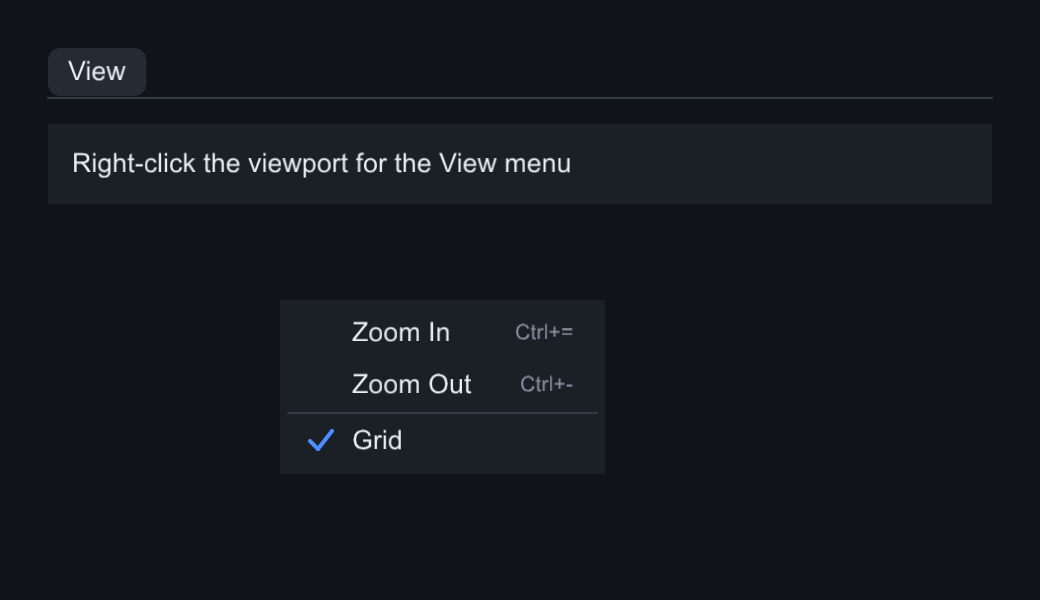
MenuBar/Menu are built once and opened as borrowed popups; any widget can
carry a right-click menu; global accelerators run before widget dispatch (a
modifier is required, so typing never triggers one). Full details and code:
Menus & toolbars.
Key names physical keys: letters, top-row digits (Num0-Num9),
punctuation, and the numeric keypad (Kp0-Kp9, KpDecimal, KpDivide,
KpMultiply, KpSubtract, KpAdd, KpEqual; keypad Enter arrives as
Enter). Bind both Equal and KpAdd to serve either zoom key.
Clipboard#
TextField/TextArea read and write the host clipboard through
ctx.set_clipboard_source / ctx.set_clipboard_sink. The GLFW backend wires
the system clipboard; without a host the Ctrl/Cmd+A/C/X/V shortcuts are
silent no-ops.
Tooltips#
Any widget carries a tooltip with set_tooltip("..."). It appears after a
~0.6 s hover delay and dismisses on mouse-away or click. Because setters
return Widget& (no deducing-this before C++23), base-class setters like
set_tooltip must come last in a chain.
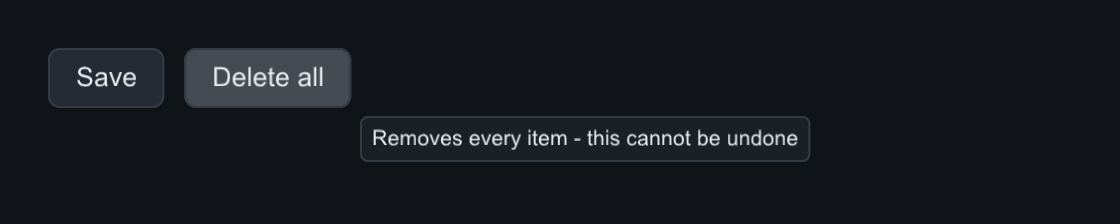
A tooltip that is showing follows changes. Calling set_tooltip with new
text swaps it at once, and "" closes it.
Different tips for different parts of a widget. The context asks the
hovered widget for its text at the pointer each tick, through
tooltip_at(pos). It defaults to the set_tooltip text. When the answer
changes under a showing tooltip, the tooltip swaps without waiting for the
delay again, so moving down a list reads row after row. The built-ins use
this:
TreeView: a row's ownRow::tooltip; otherwise its full label when the row shows it cut off with "...".ListViewandSegmented: the full text of an item or segment drawn cut off.- Otherwise each falls back to the widget's
set_tooltiptext.
A custom widget can override tooltip_at (Python too):
class Halves(slikui.Widget):
    def tooltip_at(self, pos):
        return "left" if pos.x < self.bounds.x + self.bounds.w / 2 else "right"
Cursor shapes#
Widgets request cursor shapes with set_cursor(slikui::Cursor::...) - hosts
map them to system cursors via ctx.set_cursor_host (GlfwWindow::attach
does this; in Python ctx.set_cursor_host(fn)).