Python bindings#
The slikui PyPI package binds the C++ API 1:1 through nanobind
(slikui._slikui), then adds a thin Pythonic surface in slikui._py:
kwargs-to-setters, the App shell, event constructors and pixel helpers.
New widgets land C++-first so both languages get them.
App shell#
App holds Target + Sink + Context and every owner, so the C++ side never
sees a dangling backend:
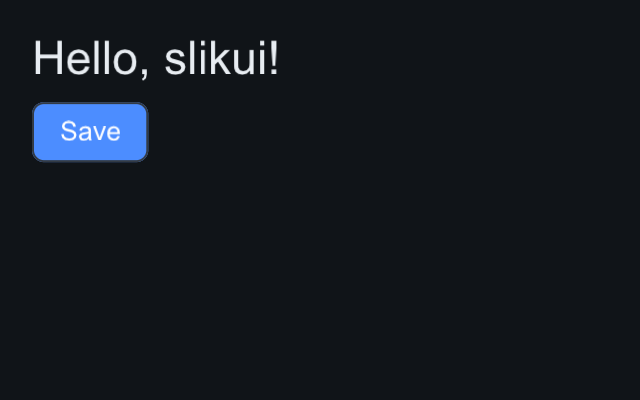
import slikui

ui = slikui.App(320, 200, scale=1.0)      # + font=..., theme=...
root = ui.set_root(slikui.Column, padding=16, gap=8)
root.add(slikui.Label, "Hello, slikui!", font_size=26)
root.add(slikui.Button, "Save", variant=slikui.ButtonVariant.Primary)

ui.tick(0.0, 1 / 60)                       # layout + animation
frame = ui.render()                        # zero-copy (H, W) uint32 ndarray
App(width, height, *, font=None, scale=1.0, theme=None)- the logical frame iswidth x height; the framebuffer carries the scale. Font defaults to the system font, falling back to the bundled DejaVu subset when none exists (headless containers).resize(w, h)- re-targets both.close()- destroys the tree and releases the Python callbacks it holds; run automatically bywith App(...) as ui:and at exit. Safe to call twice. GUI apps that keep their UI until interpreter shutdown can silence the leak report withslikui.set_leak_warnings(False).render()returns the framebuffer as a zero-copynumpyarray, 0xAABBGGRR packing;slikui.to_rgba(frame)andslikui.save_image(frame, path)convert/save.
Builder sugar#
container.add(cls, *args, **props) constructs the widget and applies
kwargs: foo= resolves to set_foo, or to the attribute/method foo
itself when there is no setter (e.g. on_click=). A wrong name is a loud
AttributeError, not a silent no-op. A tuple that the setter won't take
as one value is spread across its arguments: range=(0, 100) calls
set_range(0, 100), while items=("a", "b") still passes the tuple whole.
Setters applied this way don't fire callbacks, so on_change= and
value= can come in any order. Same for ctx.set_root(cls, ...).
For your own widget classes, kwargs named in __init__ go to the
constructor and the rest to setters: row.add(Knob, value=3, tooltip="t")
calls Knob(value=3), then set_tooltip("t").
Values: Color(r, g, b, a=255) takes 0..255 ints; use
Color.from_float(r, g, b, a=1.0) for normalized floats.
Constraints(min, max) builds arbitrary constraints (also loose, tight).
If type-level patching is unavailable, module-level
slikui.add(container, ...) / slikui.set_root(context, ...) are the
fallbacks.
Events#
Real Event values drive the real dispatch path - simulated-input tests use
them:
ui.handle(slikui.mouse_press((60, 40)))   # click through hit-testing
ui.handle(slikui.text_input("h"))         # into the focused TextField
ui.handle(slikui.scroll(pos, (0, -1)))    # wheel, "ctrl+shift" mods supported
ui.handle(slikui.key_press(slikui.Key.S, slikui.mods("ctrl")))
ui.handle(slikui.frame_resize(960, 640))  # framebuffer pixels
Constructors: mouse_move, mouse_press, mouse_release, mouse_click,
scroll, key_press, key_release, text_input, text_input_str,
focus_lost, frame_resize; mods("ctrl+shift") builds the modifier mask.
Your own renderer#
slikui.RenderSink is a trampoline over C++ IRenderSink: subclass it,
implement upload(tex) and render(commands, fb_size), and slikui hands you
every frame as a flat command list - point it at pygame, moderngl, PIL,
anything.
class MySink(slikui.RenderSink):
    def upload(self, up):
        # up.pixels: zero-copy read-only view, (H, W) uint8 for Alpha8,
        # (H, W, 4) for Rgba8. Valid during this call only: copy or upload.
        self.textures[up.id] = make_texture(up.id, up.pixels)

    def release(self, tex_id):          # optional: the owning widget died
        self.textures.pop(tex_id).free()

    def render(self, cmds, fb_size):
        a = cmds.as_array()             # (N,) slikui.DRAWCMD_DTYPE, zero-copy
        rects = a[a["type"] == slikui.DrawCmdType.Rect.value]
        ...                             # a["rect"] (N, 4) f32, a["color"] (N, 4) u8
cmds.as_array()is the fast path: one read-only structured view over the C++ command storage (fieldstype rect radius thickness hollow color tex_id uv, seeslikui.DRAWCMD_DTYPE), about 18x cheaper thanfor c in cmdson the gallery. Likeup.pixelsit borrows C++ memory valid only during the call -.copy()to keep it.release(tex_id)is called when anImage,ImageVieworCompareViewis destroyed. It can run outsiderender()(e.g. fromctx.clear_tree()), so a GPU sink should queue the delete until a context is current. Exceptions raised there are reported as unraisable, not propagated. The default is a no-op.ctx.invalidate_textures(): call after your sink lost its textures (GL context recreated); the nextrender()re-uploads the font atlas and every live widget texture.
slikui.CanvasSink is a worked example: a pure-numpy rasterizer producing
pixel-identical output to the C++ software backend (same blend/SDF/
sampling math, verified by test):
sink = slikui.CanvasSink(320, 240)
ctx = slikui.Context(sink)          # any RenderSink subclass works here
ctx.set_frame_size(320, 240)
ctx.load_default_font()             # or load_font_file(path)
# ... build the tree, tick ...
ctx.render()
frame = sink.buffer                 # (240, 320) uint32, 0xAABBGGRR
See it side by side: python python/examples/pyrenderer_demo.py renders one
tree through both renderers and reports the pixel diff (it is 0).
OpenGL: GlApp and GLSink#
For a PyOpenGL host (glfw, pygame, Qt, ...) the UI can draw straight into your GL 3.3 context - no CPU framebuffer, no per-frame texture upload:
app = slikui.GlApp(960, 640, scale=fb_w / win_w)   # GL context current
root = app.set_root(slikui.Column, padding=12)
...
while running:
    app.set_scale(fb_w / win_w); app.resize(win_w, win_h)   # before tick
    app.tick(now, dt)
    draw_scene()
    app.render(clear=False)        # over the scene; clear=True paints the background
    swap_buffers()
app.close()                        # BEFORE destroying the window (frees GL objects)
GlApp wraps slikui.GLSink, a RenderSink built on the C++
slikui.GpuBatcher: each frame is one buffer upload plus one instanced draw
per scissor/texture batch (a handful per frame). On the gallery it renders
in ~0.5 ms/frame at 1x and ~0.6 ms at 2x, against ~3 ms / ~11 ms for the C++
software sink, before that path's texture upload
(python/benchmarks/bench_render.py).
- GL state:
render()sets viewport, program, VAO, texture unit 0, blending and scissor, disables depth/cull/stencil, and leaves them - set what your next pass needs.GLSink(preserve_state=True)saves and restores them instead (slower:glGet*per frame). - Lifecycle:
init()/shutdown()need the context current;release()only queues texture deletes. After a lost/recreated context,app.reset()(orsink.reset(ctx)) rebuilds GL objects and re-uploads. One sink perContext, one GL context per sink. slikui.read_framebuffer(w, h)reads the bound framebuffer inTarget.pixels()layout (tests, screenshots).--windowexamples useGlApp; add--softwarefor the CPU path.
Input from your GLFW window (slikui.glfw_input, pyGLFW; import
slikui never imports glfw):
inp = slikui.GlfwInput(win, app)   # chains to callbacks you set earlier
slikui.glfw_input.attach_services(app.ctx, win)   # clipboard + cursors
...
glfw.poll_events()                 # events reach app.handle() as they arrive
...
inp.close()                        # restore your callbacks (window alive)
GlfwInput(win) without a target queues events (inp.take()) for hosts
that route them (UI vs scene). Or skip it and call the builders from your
own callbacks: slikui.glfw_input.mouse_button_event(win, button, action,
mods), cursor_pos_event, scroll_event, key_event, char_event,
focus_event, framebuffer_size_event - python/examples/glfw_demo.py
does this. Always map buttons through them (or map_button): GLFW's
RIGHT=1/MIDDLE=2 are slikui's MouseMiddle=1/MouseRight=2 swapped.
Input from your SDL3 window (slikui.sdl_input, PySDL3; import slikui
never imports sdl3): inp = slikui.SdlInput(window, app), then
inp.process(ev) for each polled event (returns False for events slikui
doesn't use). translate(ev) is the stateless builder;
attach_services(ctx) wires clipboard and cursors. Full host:
python/examples/sdl_demo.py.
Routing between UI and scene: app.ctx.wants_mouse(x, y) and
app.ctx.wants_keyboard() say whether an event belongs to the UI (layout
widgets - Column, Row, Spacer - let the pointer through; a custom widget
can return True from mouse_transparent() to do the same).
moderngl hosts: slikui.ModernGLSink(mgl_ctx, scale=...) is the same
sink over a moderngl.Context (pip install moderngl) - lower per-call
overhead than PyOpenGL (~0.36 ms/frame on the gallery vs ~0.6 ms). It draws
into mgl_ctx.fbo and leaves enable_only(BLEND) in effect; wrap the call
in mgl_ctx.scope(...) to keep your own state.
sink = slikui.ModernGLSink(mgl, scale=fb_w / win_w).init()
ctx = slikui.Context(sink)
...
ctx.render(False)          # over your scene, into mgl.fbo
...
ctx.clear_tree(); sink.shutdown()
slikui.GpuBatcher().build(list, frame, scale) returns the arrays
zero-copy - (N, 20) float32 instances and (M, 7) int32 batches - with
slikui.GPU_VERTEX_SHADER / GPU_FRAGMENT_SHADER, for other APIs (wgpu,
Vulkan via Python, ...). See Render backends.
Custom widgets in Python#
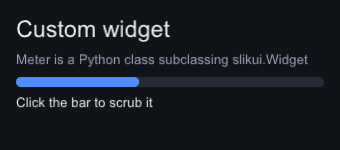
Subclass slikui.Widget and implement measure / paint / on_event
(plus opt-in tick, stretch_cross, expands_main, focusable,
widget_type) - the C++ core lays out, paints, hit-tests and dispatches
events to your class. Full details:
Custom widgets.
Rules: super().__init__() is required. Panel, Column and Row can be
subclassed the same way (overrides dispatch, and super().paint(env) /
super().measure(c) reach the built-in behaviour) - e.g. a Panel subclass
as a popup root that sees PopupClosed. Other bound widget types (Button,
Slider, ...) have no override seam: defining on_event, paint, ... on
such a subclass raises TypeError when the class is created. Add instances
with container.add_widget(obj) or container.add(Meter, ...); a custom
root is context.set_root_widget(...).
Wrappers of built-in widgets are views of widgets the C++ tree owns. Once
the tree destroys one (remove, clear_children, App.close()), using an
old wrapper raises TypeError (with a "nanobind: attempted to access an
uninitialized instance" RuntimeWarning) instead of touching freed memory.
Threads and the GIL#
Context.tick, render and handle release the GIL for the C++ part of the
frame, so other Python threads aren't starved. Python overrides, callbacks and
a Python RenderSink take the GIL back when they're called. Touch widgets
only from the UI thread; see Threading.
Versions, wheels, sources#
- PyPI:
pip install slikui-python- wheels for Python 3.10-3.14 on Linux x86_64/aarch64, macOS arm64, Windows x64; no wheel -> pip builds from the sdist (needs a C++20 compiler). - The same files are attached to every GitHub Release; the C++ side is header-only, nothing to link.
- Source layout:
python/slikui/_slikui(compiled bindings),slikui/_py(App, builder, events, pixels, CanvasSink),slikui/examples(shipped demos),python/tests,python/examples(repo-only interactive twins).