Python examples#
The wheel ships a curated demo suite as slikui.examples - the usage
reference that matches the slikui version you installed. Every example
file runs on its own (copy it anywhere and run python controls.py),
checks itself, and drives the real event dispatch path. Every widget quoted
on these pages is self-contained: paste the block into your own file and it
runs, imports included.
Run them#
The examples ship in the wheel, so there is nothing to download:
pip install slikui-python                       # headless: renders to PNG
pip install "slikui-python[demo]"               # + glfw and PyOpenGL for live windows

python -m slikui.examples.controls --window     # open one live (any name below)
python -m slikui.examples.controls              # or headless: writes ./controls.png
The quotes around "slikui-python[demo]" matter in zsh, the macOS default
shell. The suite itself:
python -m slikui.examples --list        # what's shipped
python -m slikui.examples --where       # the directory: read the sources
python -m slikui.examples --contract    # what a custom widget receives, measured live
python -m slikui.examples --smoke all   # scripted self-check of every example
slikui-examples is the same launcher as a command.
help(slikui.examples) prints the index and the custom-widget contract in
one screen.
The suite#
| # | Example | Shows |
|---|---|---|
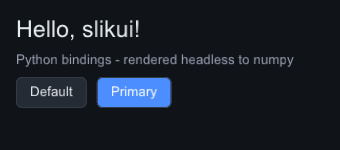
| 01 | hello |
first frame, minimal tree, headless render |
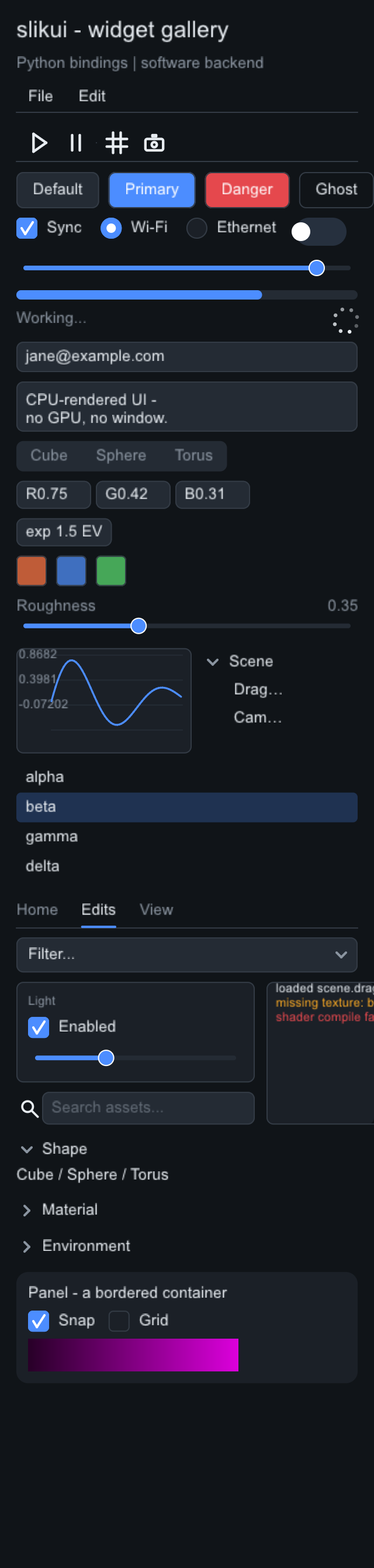
| 02 | gallery |
widget survey - most built-in widgets in one tall page |
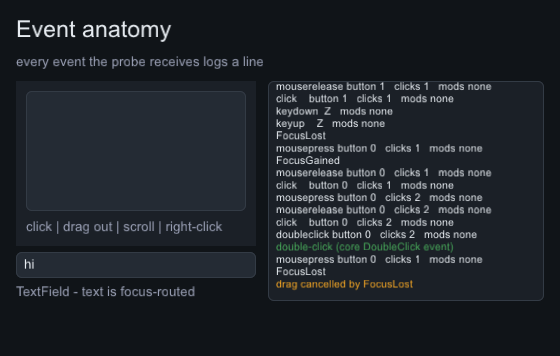
| 03 | events |
event anatomy: EventProbe narrates every event it receives |
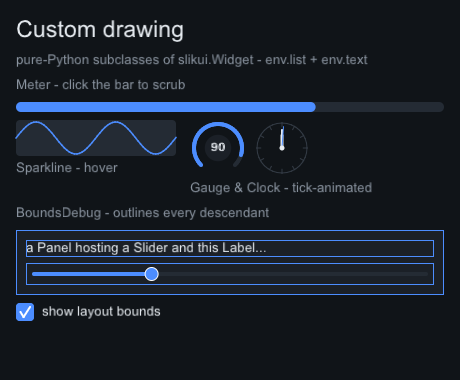
| 04 | paint |
drawing cookbook: Meter, Sparkline, RadialGauge, ClockFace, BoundsDebug |
| 05 | controls |
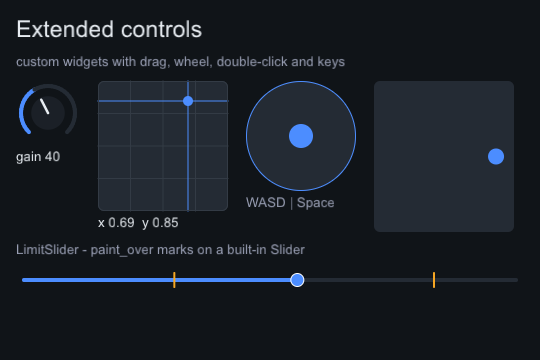
Knob, XYPad, Joystick with full mouse + keyboard; LimitSlider decorates a built-in |
| 06 | keyboard |
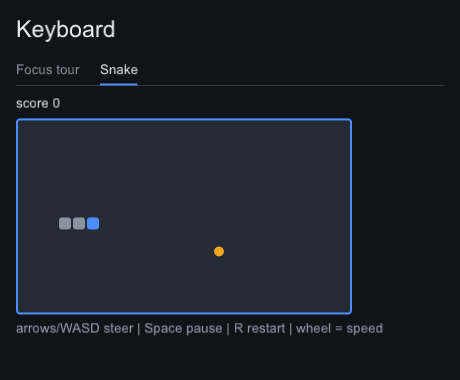
focus traversal and rings, global shortcuts, Snake |
| 07 | renderer |
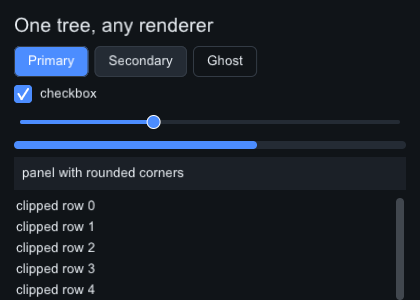
the render contract: two renderers, identical pixels, and your own |
| 08 | window |
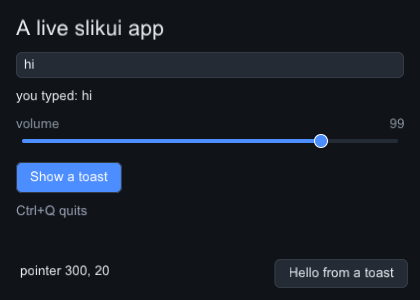
a live app in a GLFW window (the same tour runs headless) |
| 09 | text |
Label styles, font families, custom widgets that draw, measure, wrap, truncate and select text |
See them#
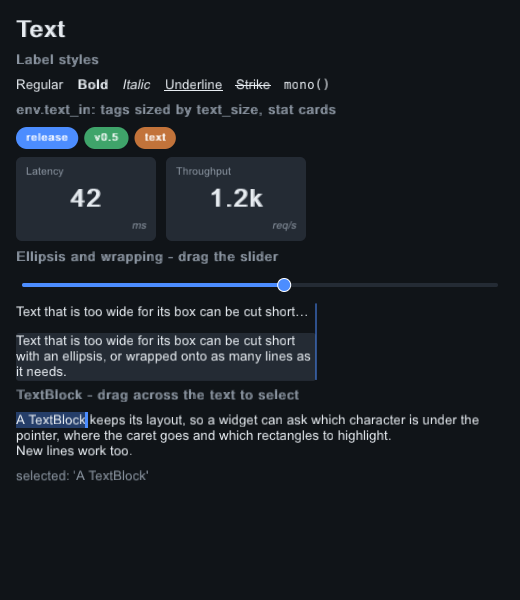
The frames below are the examples' own --smoke output - post-interaction
frames captured by the same scripted pass CI runs:
Every example has the same four modes#
python -m slikui.examples.paint              # headless render -> paint.png
python -m slikui.examples.paint --png out.png
python -m slikui.examples.paint --smoke      # scripted interaction pass, self-checking
python -m slikui.examples.paint --window     # live GLFW window (needs the demo extra)
- Default - render one frame to
./NAME.png; no display, no glfw. --smoke- synthetic input (click, drag, scroll, keys) against a fixed clock; asserts and prints a transcript. This is what CI runs, so the examples double as the wheel's acceptance test.--window- the same demo live: GLFW callbacks feed real events, the core renders into its framebuffer, and a thin premultiplied blit puts it on screen. Needspip install "slikui-python[demo]"; the host is imported lazily, so the base wheel never pulls in glfw or PyOpenGL.
EventProbe in depth#
events is the place to start if you're writing a custom widget: it shows
what arrives and in what order - enter/leave, press/release/click,
double-click, a captured drag, focus gained/lost, key down/up. It has its
own section in
Input & events.
Custom widgets in depth#
paint is the worked drawing example - measure/arrange/paint, direct
DrawList drawing, tick animation, hover via MouseLeave, and a debug
overlay drawn with paint_over. See Custom widgets for
the guide and the screenshot-capture contract (--docs-image).
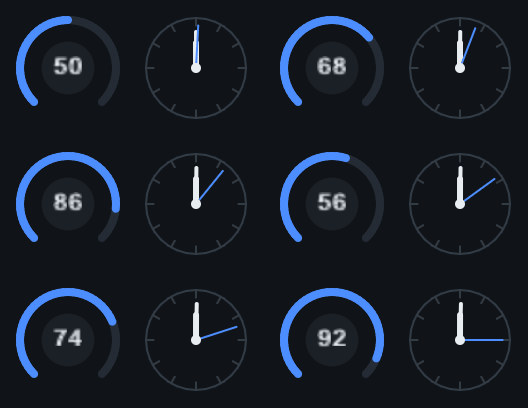
Extended controls#
controls builds three controls the built-in set doesn't have. Every drag
uses one idiom - capture the mouse on press, release on release, cancel on
FocusLost - so drags survive the pointer leaving the widget:
import math

import slikui

T, K = slikui.EventType, slikui.Key
LEFT = slikui.MouseButton.MouseLeft


class Knob(slikui.Widget):
    """Rotary dial over [lo, hi]. ``on_change(value)`` fires on every edit."""

    START, SWEEP, DRAG_PX = 135.0, 270.0, 150.0  # degrees; px per full range

    def __init__(self, lo=0.0, hi=1.0, value=0.5, step=0.05):
        super().__init__()
        self.lo, self.hi, self.step = lo, hi, step
        self.value = self.default = min(max(value, lo), hi)
        self.on_change = None
        self._drag = None  # (start y, start value) while dragging
        self.set_cursor(slikui.Cursor.ResizeV)

    def set(self, v):
        v = min(max(v, self.lo), self.hi)
        if v != self.value:
            self.value = v
            if self.on_change:
                self.on_change(v)

    def measure(self, constraints):
        return constraints.clamp(slikui.Size(64, 64))

    def stretch_cross(self):
        return False

    def focusable(self):
        return True

    def on_event(self, e):
        span = self.hi - self.lo
        if e.type == T.MousePress and e.button == LEFT:
            self._drag = (e.pos.y, self.value)
            self.context.capture_mouse(self)
            return True
        if e.type == T.MouseMove and self._drag:
            y0, v0 = self._drag
            fine = 0.1 if e.shift else 1.0
            self.set(v0 + (y0 - e.pos.y) / self.DRAG_PX * span * fine)
            return True
        if e.type in (T.MouseRelease, T.FocusLost) and self._drag:
            self._drag = None
            self.context.release_mouse(self)
            return True
        if e.type == T.DoubleClick:
            self.set(self.default)
            return True
        if e.type == T.Scroll:
            self.set(self.value + e.scroll.y * self.step * span)
            return True
        if e.type == T.KeyPress and self.focused:
            step = self.step * span * (0.1 if e.ctrl else 1.0)
            moves = {K.Left: -step, K.Down: -step, K.Right: step, K.Up: step}
            if e.key in moves:
                self.set(self.value + moves[e.key])
            elif e.key == K.Home:
                self.set(self.lo)
            elif e.key == K.End:
                self.set(self.hi)
            else:
                return False
            return True
        return False

    def _pt(self, cx, cy, r, t):
        a = math.radians(self.START + t * self.SWEEP)
        return slikui.Vec2(cx + r * math.cos(a), cy + r * math.sin(a))

    def paint(self, env):
        b, th = self.bounds, env.theme
        cx, cy = b.x + b.w / 2, b.y + b.h / 2
        r = min(b.w, b.h) / 2 - 5
        t = (self.value - self.lo) / ((self.hi - self.lo) or 1.0)
        n = 36
        for i in range(n):  # track, then the value arc over it
            col = th.accent if (i + 1) / n <= t + 1e-6 else th.surface_alt
            env.list.line(self._pt(cx, cy, r, i / n), self._pt(cx, cy, r, (i + 1) / n),
                          col, 4.0)
        env.list.circle(slikui.Vec2(cx, cy), r * 0.62, th.surface)
        env.list.line(slikui.Vec2(cx, cy), self._pt(cx, cy, r * 0.55, t), th.text, 2.5)
        if self.focused:  # a round focus ring: hollow_rect with full radius
            env.list.hollow_rect(b.inflate(-1, -1), th.accent, 1.5, b.w / 2)
Joystick holds a key set from KeyPress/KeyRelease, so WASD pushes
the stick only while held; the stick springs back in tick:
import math

import slikui

T, K = slikui.EventType, slikui.Key
LEFT = slikui.MouseButton.MouseLeft


class Joystick(slikui.Widget):
    """Stick vector in the unit disc (y up), springing back to centre."""

    SPRING = 12.0  # 1/s - exponential return rate
    KEYS = {K.W: (0, 1), K.Up: (0, 1), K.S: (0, -1), K.Down: (0, -1),
            K.A: (-1, 0), K.Left: (-1, 0), K.D: (1, 0), K.Right: (1, 0)}

    def __init__(self):
        super().__init__()
        self.vx = self.vy = 0.0
        self.frozen = False
        self._dragging = False
        self._held = set()  # keys currently down - needs KeyRelease

    def measure(self, constraints):
        return constraints.clamp(slikui.Size(110, 110))

    def stretch_cross(self):
        return False

    def focusable(self):
        return True

    def _aim(self, p):
        b = self.bounds
        r = b.w / 2 - 14
        x, y = (p.x - b.center().x) / r, -(p.y - b.center().y) / r
        m = math.hypot(x, y)
        self.vx, self.vy = (x / m, y / m) if m > 1 else (x, y)

    def on_event(self, e):
        if e.type == T.MousePress and e.button == LEFT:
            self._dragging = True
            self._aim(e.pos)
            self.context.capture_mouse(self)
            return True
        if e.type == T.MouseMove and self._dragging:
            self._aim(e.pos)
            return True
        if e.type in (T.MouseRelease, T.FocusLost) and self._dragging:
            self._dragging = False
            self.context.release_mouse(self)
        if e.type == T.FocusLost:
            self._held.clear()
        if e.type == T.KeyPress and e.key in self.KEYS:
            self._held.add(e.key)
            return True
        if e.type == T.KeyRelease and e.key in self.KEYS:
            self._held.discard(e.key)
            return True
        if e.type == T.KeyPress and e.key == K.Space:
            self.frozen = not self.frozen
            return True
        return False

    def tick(self, t):
        if self._dragging or self.frozen:
            return
        if self._held:  # keys push the stick to the rim
            x = sum(self.KEYS[k][0] for k in self._held)
            y = sum(self.KEYS[k][1] for k in self._held)
            m = math.hypot(x, y) or 1.0
            self.vx, self.vy = x / m, y / m
            return
        k = math.exp(-self.SPRING * t.dt)  # spring back
        self.vx, self.vy = self.vx * k, self.vy * k

    def paint(self, env):
        b, th = self.bounds, env.theme
        env.list.rect(b, th.surface_alt, b.w / 2)
        env.list.hollow_rect(b, th.accent if self.focused else th.border, 1, b.w / 2)
        r = b.w / 2 - 14
        c = b.center()
        knob = slikui.Vec2(c.x + self.vx * r, c.y - self.vy * r)
        env.list.line(c, knob, th.border, 3)
        env.list.circle(knob, 12, th.warning if self.frozen else th.accent)


class BallBox(slikui.Widget):
    """A ball steered by a Joystick: velocity follows the stick."""

    def __init__(self, stick):
        super().__init__()
        self.stick = stick
        self.x, self.y, self.vx, self.vy = 0.5, 0.5, 0.0, 0.0

    def measure(self, constraints):
        return constraints.clamp(slikui.Size(140, 110))

    def tick(self, t):
        self.vx += self.stick.vx * 2.0 * t.dt
        self.vy -= self.stick.vy * 2.0 * t.dt
        self.vx *= 0.98
        self.vy *= 0.98
        self.x += self.vx * t.dt
        self.y += self.vy * t.dt
        for p, v in (("x", "vx"), ("y", "vy")):  # bounce off the walls
            if not 0.0 <= getattr(self, p) <= 1.0:
                setattr(self, p, min(max(getattr(self, p), 0.0), 1.0))
                setattr(self, v, -getattr(self, v))

    def paint(self, env):
        b, th = self.bounds, env.theme
        env.list.rect(b, th.surface_alt, 6)
        env.list.circle(slikui.Vec2(b.x + 8 + self.x * (b.w - 16),
                                    b.y + 8 + self.y * (b.h - 16)), 8, th.accent)
LimitSlider decorates the built-in Slider, which Python can't subclass:
it wraps one, delegates layout, and draws its marks in paint_over, after
the Slider has painted:
import slikui


class LimitSlider(slikui.Widget):
    """The built-in Slider with limit marks on its track.

    Python can't subclass bound widgets, so this wraps one: layout is
    delegated to the child, and the marks are drawn in ``paint_over`` -
    after the Slider has painted, so they sit on top of its track. The
    track geometry mirrors the Slider's paint (8 px inset, centred; no
    label row).
    """

    INSET = 8.0

    def __init__(self, lo, hi, value, limits):
        super().__init__()
        self.lo, self.hi, self.limits = lo, hi, limits
        self.slider = self.add(slikui.Slider, lo, hi, value=value)

    def measure(self, constraints):
        return self.slider.measure(constraints)

    def arrange(self, area):
        self.bounds = area
        self.slider.arrange(area)

    def paint_over(self, env):
        b, th = self.slider.bounds, env.theme
        x0, x1 = b.x + self.INSET, b.right() - self.INSET
        cy = b.y + b.h / 2
        for v in self.limits:
            x = x0 + (v - self.lo) / (self.hi - self.lo) * (x1 - x0)
            env.list.line(slikui.Vec2(x, cy - 7), slikui.Vec2(x, cy + 7), th.warning, 2)
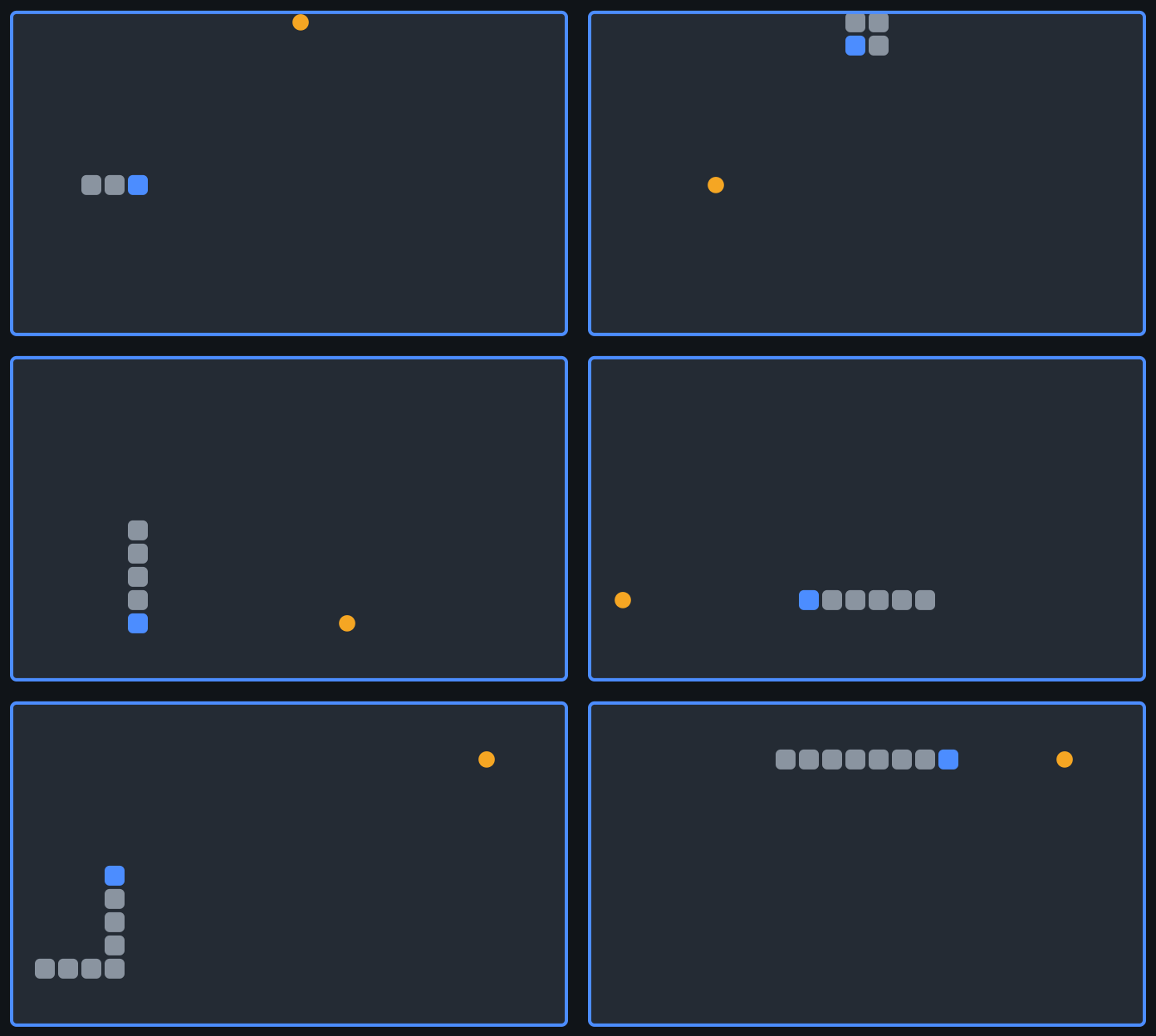
Keyboard#
keyboard covers focus traversal (each chip draws its own focus ring and
reports FocusGained/FocusLost), a global Ctrl+R
shortcut, and a whole game in one widget:
import random

import slikui

T, K = slikui.EventType, slikui.Key


class Snake(slikui.Widget):
    """Grid snake. Steering is buffered per step so a quick Up+Left between
    two steps can't reverse the snake into itself."""

    COLS, ROWS, CELL = 24, 14, 14
    DIRS = {K.Up: (0, -1), K.W: (0, -1), K.Down: (0, 1), K.S: (0, 1),
            K.Left: (-1, 0), K.A: (-1, 0), K.Right: (1, 0), K.D: (1, 0)}

    def __init__(self, seed=7):
        super().__init__()
        self.rng = random.Random(seed)  # deterministic food for scripted runs
        self.rate = 6.0                 # steps per second
        self.on_score = None
        self.restart()

    def restart(self):
        y = self.ROWS // 2
        self.body = [(5, y), (4, y), (3, y)]   # head first
        self.dir = self.next_dir = (1, 0)
        self.score, self.paused, self.dead, self._acc = 0, False, False, 0.0
        self.place_food()
        if self.on_score:
            self.on_score(self.score)

    def place_food(self):
        free = [(x, y) for x in range(self.COLS) for y in range(self.ROWS)
                if (x, y) not in self.body]
        self.food = self.rng.choice(free)

    def measure(self, constraints):
        return constraints.clamp(slikui.Size(self.COLS * self.CELL, self.ROWS * self.CELL))

    def stretch_cross(self):
        return False

    def focusable(self):
        return True

    def draws_own_focus(self):
        return True  # paint() shows focus; no built-in ring on top

    def on_event(self, e):
        if e.type == T.FocusLost:
            self.paused = True  # never run unattended
        elif e.type == T.KeyPress and e.key in self.DIRS:
            d = self.DIRS[e.key]
            if d != (-self.dir[0], -self.dir[1]):  # no reversing
                self.next_dir = d
            return True
        elif e.type == T.KeyPress and e.key == K.Space:
            self.paused = not self.paused
            return True
        elif e.type == T.KeyPress and e.key == K.R:
            self.restart()
            return True
        elif e.type == T.Scroll:
            self.rate = min(max(self.rate + e.scroll.y, 2.0), 20.0)
            return True
        return e.type == T.MousePress

    def step(self):
        self.dir = self.next_dir
        hx, hy = self.body[0]
        head = (hx + self.dir[0], hy + self.dir[1])
        if (not (0 <= head[0] < self.COLS and 0 <= head[1] < self.ROWS)
                or head in self.body[:-1]):
            self.dead = True
            return
        self.body.insert(0, head)
        if head == self.food:
            self.score += 1
            if self.on_score:
                self.on_score(self.score)
            self.place_food()
        else:
            self.body.pop()

    def tick(self, t):
        if self.paused or self.dead:
            return
        self._acc += t.dt
        while self._acc >= 1.0 / self.rate and not self.dead:
            self._acc -= 1.0 / self.rate
            self.step()

    def paint(self, env):
        b, th, c = self.bounds, env.theme, self.CELL
        env.list.rect(b, th.surface_alt, 4)

        def cell(x, y, color, inset=1.0, radius=3.0):
            env.list.rect(slikui.Rect(b.x + x * c + inset, b.y + y * c + inset,
                                      c - 2 * inset, c - 2 * inset), color, radius)

        env.list.circle(slikui.Vec2(b.x + (self.food[0] + 0.5) * c,
                                    b.y + (self.food[1] + 0.5) * c), c * 0.35, th.warning)
        for i, (x, y) in enumerate(self.body):
            cell(x, y, th.danger if self.dead else (th.accent if i == 0 else th.text_dim))
        edge = th.accent if self.focused else th.border
        env.list.hollow_rect(b, edge, 2 if self.focused else 1, 4)
Text#
text draws all of its text from custom widgets (see
Drawing text). Tag measures itself
with text_size and centers its text with env.text_in:
import slikui


class Tag(slikui.Widget):
    """A pill-shaped label sized to its text: ``measure`` asks the context
    how big the text is, ``paint`` centers it in the pill with
    ``env.text_in``. The same options go to both calls, so they agree."""

    PAD_X, PAD_Y = 10, 4

    def __init__(self, text, color=None):
        super().__init__()
        self.text = text
        self.color = color  # None -> theme accent

    def opts(self):
        return dict(size=12, bold=True)

    def measure(self, constraints):
        s = self.context.text_size(self.text, **self.opts())
        return constraints.clamp(slikui.Size(s.w + 2 * self.PAD_X,
                                             s.h + 2 * self.PAD_Y))

    def stretch_cross(self):
        return False

    def paint(self, env):
        b = self.bounds
        env.list.rect(b, self.color or env.theme.accent, b.h / 2)
        env.text_in(b, self.text, align="center", valign="middle",
                    color=slikui.Color(255, 255, 255), **self.opts())
SelectableText keeps a TextBlock, re-laid only when its width changes,
and uses it for drag-to-select:
import slikui


class SelectableText(slikui.Widget):
    """Wrapped, drag-to-select text: a kept ``TextBlock`` answers which
    character is under the pointer (``hit_test``), where the caret goes
    (``caret_rect``) and what to highlight (``selection_rects``). Indices
    are ordinary ``str`` indices."""

    def __init__(self, text, on_select=None):
        super().__init__()
        self.text = text
        self.on_select = on_select
        self.block = None
        self.anchor = self.caret = 0
        self.dragging = False

    @property
    def selected(self):
        a, b = sorted((self.anchor, self.caret))
        return self.text[a:b]

    def measure(self, constraints):
        w = constraints.max.x if constraints.max.x < 1e6 else 0
        return constraints.clamp(self.context.text_size(self.text, wrap=True,
                                                        max_width=w))

    def arrange(self, area):
        self.bounds = area
        # Re-lay the block only when the width changes.
        if self.block is None or self.block_w != area.w:
            self.block = self.context.text_layout(self.text, area.w)
            self.block_w = area.w

    def _index(self, pos):
        return self.block.hit_test(slikui.Vec2(pos.x - self.bounds.x,
                                               pos.y - self.bounds.y))

    def on_event(self, e):
        T = slikui.EventType
        if e.type == T.MousePress and e.button == slikui.MouseButton.MouseLeft:
            self.anchor = self.caret = self._index(e.pos)
            self.dragging = True
            self.context.capture_mouse(self)
            return True
        if e.type == T.MouseMove and self.dragging:
            self.caret = self._index(e.pos)
            return True
        if e.type == T.MouseRelease and self.dragging:
            self.dragging = False
            self.context.release_mouse(self)
            if self.on_select:
                self.on_select(self.selected)
            return True
        return False

    def paint(self, env):
        if self.block is None:
            return
        b, th = self.bounds, env.theme
        for r in self.block.selection_rects(self.anchor, self.caret):
            env.list.rect(slikui.Rect(b.x + r.x, b.y + r.y, r.w, r.h),
                          th.accent.with_alpha(0.35))
        env.draw(self.block, slikui.Vec2(b.x, b.y))
        c = self.block.caret_rect(self.caret)
        env.list.rect(slikui.Rect(b.x + c.x, b.y + c.y, 1.5, c.h), th.accent)
The C++ twin is examples/07_text (--smoke runs the same checks
headless).
Your own renderer#
renderer proves the C++ and pure-Python renderers produce identical
frames, then shows the seam a third-party renderer plugs into:
from collections import Counter

import slikui


class TraceSink(slikui.RenderSink):
    """The skeleton of a third-party renderer.

    ``upload`` gets each texture once (and again when it changes):
    ``up.id``, ``up.width``, ``up.height``, ``up.format`` (Alpha8 for the
    font atlas, Rgba8 for images) and ``up.pixels``. Create your GPU
    texture here, keyed by ``up.id``.

    ``render`` gets the whole frame, in paint order. Per command:

    * Rect  - ``rect``, ``color``, ``radius``; ``hollow`` + ``thickness``
      for outlines (a rounded-rect SDF quad on the GPU).
    * Line  - from ``(rect.x, rect.y)`` to ``(rect.x + rect.w,
      rect.y + rect.h)``, ``thickness``, ``color`` (a capsule).
    * Glyph - textured quad: ``rect`` on screen, ``uv`` in *texel* units
      of texture ``tex_id`` (alpha8), tinted by ``color``.
    * Image - like Glyph, rgba texture, untinted.
    * ClipPush / ClipPop - a scissor stack: intersect ``rect`` with the top.

    Coordinates are logical points; multiply by your HiDPI scale. To draw
    over your own 3D scene, call ``ctx.render(False)`` so slikui skips its
    full-frame background rect.
    """

    def __init__(self, width, height):
        super().__init__()
        self.inner = slikui.CanvasSink(width, height)  # stand-in backend
        self.uploads = {}       # tex id -> (w, h, format)
        self.counts = Counter()

    def upload(self, up):
        self.uploads[up.id] = (up.width, up.height, up.format)
        self.inner.upload(up)          # -> glTexImage2D / pygame.Surface ...

    def render(self, cmds, framebuffer_size):
        self.counts = Counter(c.type.name for c in cmds)
        self.inner.render(cmds, framebuffer_size)  # -> your draw loop
A live window#
window runs a small tour in a real window; its root widget sees every
mouse move that bubbles up unconsumed:
import slikui


class PointerRoot(slikui.Widget):
    """Root container that reports the pointer position: events bubble from
    the widget under the pointer up to the root unless a widget consumes
    them, so the root sees moves over anything that doesn't."""

    def __init__(self):
        super().__init__()
        self.on_pointer = None

    def measure(self, constraints):
        return self.children[0].measure(constraints)

    def arrange(self, area):
        self.bounds = area
        self.children[0].arrange(area)

    def on_event(self, e):
        if e.type == slikui.EventType.MouseMove and self.on_pointer:
            self.on_pointer(e.pos.x, e.pos.y)
        return False
Any windowing toolkit works the same way: translate its input into
slikui.mouse_press / key_press / text_input (and friends) events for app.handle, call
app.tick then app.render each frame, and show the returned
(H, W) uint32 array.