Data display#
The data-display family for demo panels: lists, trees, tables, the property
inspector, plots and images. Series and rows accept numpy arrays in Python
and std::vector in C++.
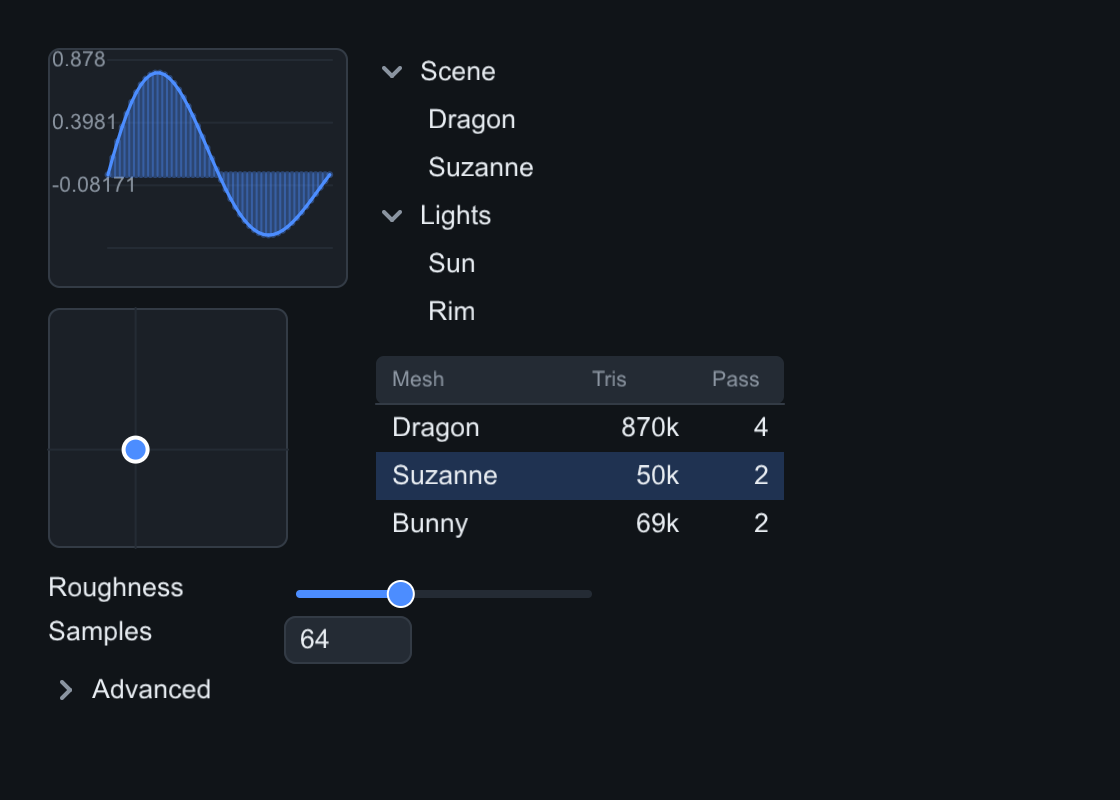
Each image is real output from tools/components_capture.cpp - the snippets
are the capture code.
ListView, Tabs, Dropdown#
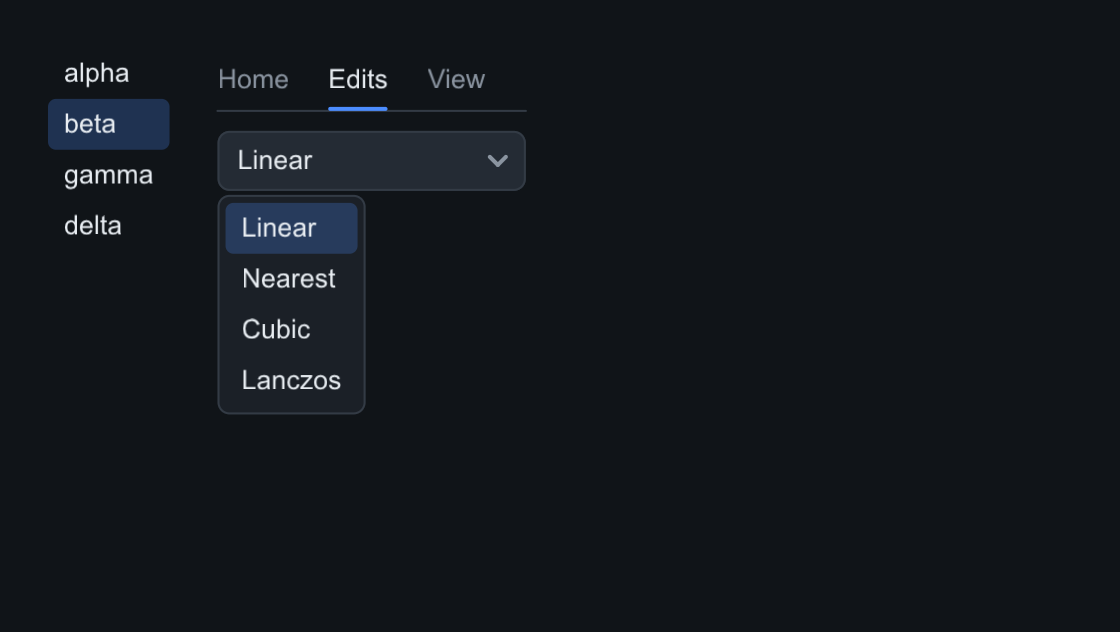
ListView is a selectable item list (on_select(void(size_t))). Tabs is a
tab bar (set_tabs, on_change). Dropdown opens its selection popup on
click - the screenshot shows it after a simulated press:
auto& row = root.add<slikui::Row>();
row.set_gap(24);
auto& list = row.add<slikui::ListView>();
list.set_items({"alpha", "beta", "gamma", "delta"}).set_selected(1);
auto& col = row.add<slikui::Column>();
col.set_gap(10);
col.add<slikui::Tabs>().set_tabs({"Home", "Edits", "View"}).set_selected(1);
col.add<slikui::Dropdown>().set_items({"Linear", "Nearest", "Cubic", "Lanczos"})
    .set_placeholder("Filter...").set_selected(0);
row = root.add(slikui.Row, gap=24)
row.add(slikui.ListView, items=["alpha", "beta", "gamma", "delta"],
        selected=1)
col = row.add(slikui.Column, gap=10)
col.add(slikui.Tabs, tabs=["Home", "Edits", "View"], selected=1)
col.add(slikui.Dropdown, items=["Linear", "Nearest", "Cubic", "Lanczos"],
        placeholder="Filter...", selected=0)
| API | Signature |
|---|---|
ListView::set_items |
(std::vector<std::string>) |
ListView::set_selected |
(long index) |
ListView::on_select |
(std::function<void(size_t)>) |
ListView::on_activate |
(std::function<void(size_t)>) - double-click (after on_select), or Enter / Space on the selection |
ListView::set_single_click_activate |
(bool) - a single click activates too (pick lists) |
Tabs::set_tabs |
(std::vector<std::string>) |
Tabs::set_selected / on_change |
tab index |
Dropdown::set_items / set_placeholder / set_selected / on_select |
like ListView |
Dropdown::popup_list |
() -> ListView* - the open popup's list, null while closed |
Keyboard, when focused:
| Widget | Keys |
|---|---|
ListView |
Up/Down move the selection, Home/End jump to the ends, PageUp/PageDown move by a screenful (each move fires on_select and scrolls the row into view); Enter/Space fire on_activate |
Dropdown (closed) |
Up/Down step the selection, Home/End jump to the ends (firing on_select); Space, Enter or Alt+Down open the list |
Tabs |
Left/Right select the previous/next tab (wrapping), Home/End the first/last |
Dropdown (open) |
Up/Down/Home/End/PageUp/PageDown move the highlight; Enter or a click commits; Escape cancels. Focus then returns to the Dropdown |
Plot#
Line series with autoscale (or set_x_range/set_y_range), grid + tick
labels, optional area fill, markers - and set_bars turns series 0 into a
histogram.
| API | Signature |
|---|---|
set_series |
C++ (std::vector<Vec2>, color) |
add_series |
extra series (C++ also (xs_array, ys_array, color) in Python) |
set_x_range / set_y_range |
(min, max) - disable autoscale |
set_bars / set_fill / set_markers |
(bool) |
Vec2Pad#
Keyboard: the arrow keys nudge a focused pad by 1% of the range (Shift: 10%); Up raises y.
A 2D pad with a draggable dot - light directions, UV offsets. Pictured bottom left of the capture below.
| API | Signature |
|---|---|
set_value |
(Vec2, bool fire_callback = false) |
set_range |
(Vec2 min, Vec2 max) |
on_change |
(std::function<void(Vec2)>) |
TreeView#
Takes a flat (label, depth, expandable) row list; expansion state lives in
the widget, chevron clicks toggle, rows select.
Large trees stay fast. Paint draws only the rows on screen. The natural width
measures each label once, when its row first becomes visible, so labels under
collapsed parents cost nothing. set_natural_width(w) fixes the width and
skips measuring entirely.
| API | Notes |
|---|---|
Row{label, depth, expandable, expanded, tooltip} |
expanded (default true) is the row's initial state, read by set_rows; tooltip is the row's hover text (default: the full label when the row is cut off) |
set_rows(rows) |
replaces the rows and their expansion state; clears the selection |
set_expanded(i, open, fire_callback = false) / expanded(i) |
fires on_toggle only when asked and the state changes |
on_select(fn(i)) |
a row was selected (click or keys) |
on_toggle(fn(i, open)) |
an arrow click or Left/Right key opened or closed row i |
on_activate(fn(i)) |
double-click, or Enter/Space on the selection |
set_natural_width(w) |
fixed natural width (logical px); 0 = widest visible row |
visible_count() / row_rect(i) |
rows not under a collapsed parent; a row's rect for scroll_to |
Keyboard, when focused: Up/Down move through the visible rows, Home/End and PageUp/PageDown jump. Right opens a closed row, or steps into an open one's first child. Left closes an open row, or steps to the parent. Moves scroll the row into view.
Table#
Columns + header + selectable rows with per-column alignment and cell
clipping. set_columns takes (title, width, right_align?) specs.
table = right.add(slikui.Table)
table.set_columns([
    slikui.Table.ColumnSpec("Mesh", 100),
    slikui.Table.ColumnSpec("Tris", 60, right_align=True),
    slikui.Table.ColumnSpec("Pass", 44, right_align=True),
])
table.set_rows([["Dragon", "870k", "4"], ["Suzanne", "50k", "2"],
                ["Bunny", "69k", "2"]])
table.set_selected(1)
| API | Notes |
|---|---|
on_select(fn(i)) |
a row was selected (click or keys) |
on_activate(fn(i)) |
double-click, or Enter/Space on the selection |
row_rect(i) |
a row's absolute rect, e.g. for ScrollArea::scroll_to |
Keyboard, when focused: Up/Down, Home/End and PageUp/PageDown move the row selection and scroll it into view.
PropertyGrid#
The inspector: add_property(label) rows with a fixed label column (drop any
editor into the returned row) and collapsible add_sections.
Image#
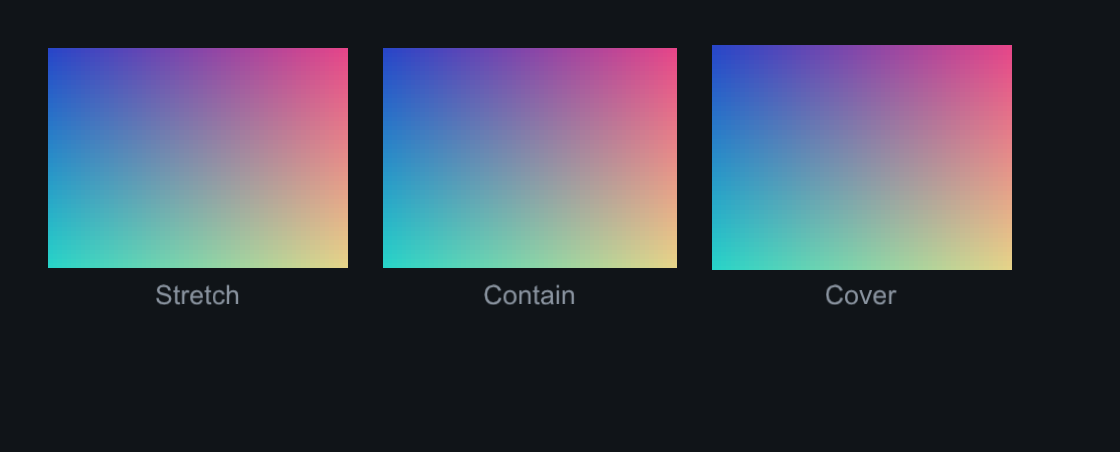
Decodes PNG/JPEG via vendored stb_image. Feed it pixels you already have
(set_pixels), a file (set_file), or an encoded memory blob (set_memory).
set_fit chooses how the source maps into the widget rect. Textures upload
through the same TexUpload channel as the font atlas, so every backend gets
it for free.
auto& row = root.add<slikui::Row>();
row.set_gap(16);
const char* names[3] = {"Stretch", "Contain", "Cover"};
slikui::Image::Fit fits[3] = {slikui::Image::Fit::Stretch,
                              slikui::Image::Fit::Contain,
                              slikui::Image::Fit::Cover};
for (int i = 0; i < 3; ++i) {
    auto& cell = row.add<slikui::Column>();
    cell.set_gap(6).set_cross(slikui::CrossMode::Center);
    cell.add<slikui::Image>("gradient").set_pixels(64, 48, grad_rgba)
        .set_size(150, 110).set_fit(fits[i]);
    cell.add<slikui::Label>(names[i]).set_color(ctx.theme().text_dim);
}
row = root.add(slikui.Row, gap=16)
for name, fit in [("Stretch", slikui.ImageFit.Stretch),
                  ("Contain", slikui.ImageFit.Contain),
                  ("Cover", slikui.ImageFit.Cover)]:
    cell = row.add(slikui.Column, gap=6, cross=slikui.CrossMode.Center)
    cell.add(slikui.Image, "gradient").set_pixels(64, 48, grad_rgba) \
        .set_size(150, 110).set_fit(fit)
    cell.add(slikui.Label, name).set_color(ui.ctx.theme.text_dim)